If you have just unboxed your Furby, I recommend starting with Dance Party: it gives you one clear activity and simple head-and-tummy controls to try. Once that feels familiar, move on to Copy Cat or a quieter routine. There is no need to learn every prompt at once.
02 / SAY THE WORD
Your Furby commands list.
Pick a mood, find a prompt and open the card for its controls. A command starts a mode; the mode is the activity; responses are the sounds and actions Furby produces. The advertised 600-plus responses do not mean 600 different commands.
8 commands shown
Play mode
Dance Party
Music, movement and a little living-room party. Start here when you want lively play.
How to use it: Dance Party
Tap the head to skip a song; tap the tummy to hear it again. More songs and activities become available as you play.
Play mode
Copy Cat
Say something short and hear Furby repeat it in a silly voice.
How to use it: Copy Cat
After the prompt, say your phrase. Use the head to change voices and the tummy to repeat. Try one short phrase at a time.
Play mode
Tell My Fortune
Choose a playful fortune or ask a just-for-fun question.
How to use it: Tell My Fortune
Rub the tummy in Crystal Furball mode. Shake to switch to Magic Furball, then ask a question and shake for an answer. Keep fortunes as pretend play.
Play mode
Let’s Chill
Swap the dance floor for a quieter moment together.
How to use it: Let’s Chill
Listen for the calm activity and follow along. Tap the head to explore another routine. This is a play mode; use the power controls when you want Furby to stop.
Play mode
Light Show
Let the illuminated ears take centre stage.
How to use it: Light Show
Tap the head for another colour pattern or touch the tummy for a light effect. Hasbro warns that the toy’s flashes may trigger seizures in people sensitive to flashing lights.
Extra prompt
I Love You
An extra voice prompt for a sweet exchange with your Furby.
How to use it: I Love You
Start with the same heart-gem and Hey Furby sequence, then say I Love You. This is one of the three Easter egg prompts named by Hasbro.
Extra prompt
Fun Fact
Try a different side of Furby’s conversation.
How to use it: Fun Fact
Say Fun Fact after the listening signal. Hasbro identifies it as an extra prompt and suggests tapping the head to explore more responses.
Extra prompt
Selfie
One more little surprise to add to playtime.
How to use it: Selfie
Say Selfie after the listening signal, then follow Furby’s response. Hasbro lists this alongside I Love You and Fun Fact as an Easter egg prompt.
No matching commands. Try “dance”, “copy” or “light”.
✦
Yes, the extra prompts are real.Hasbro confirms “I Love You”, “Fun Fact” and “Selfie”. They are additional discoveries alongside the five play modes. Read Hasbro’s explanation (opens in a new tab) ↗
Make room for a little dance party. Take turns giving the prompt, then let everyone join the music.
03 / A LITTLE QUIET TIME
Ready to call it a day?
Sleep, power off and Let’s Chill do different things. Choose the one that fits the moment.
Furby responds to gentle physical play, too. The same touch can do different things inside a play mode.
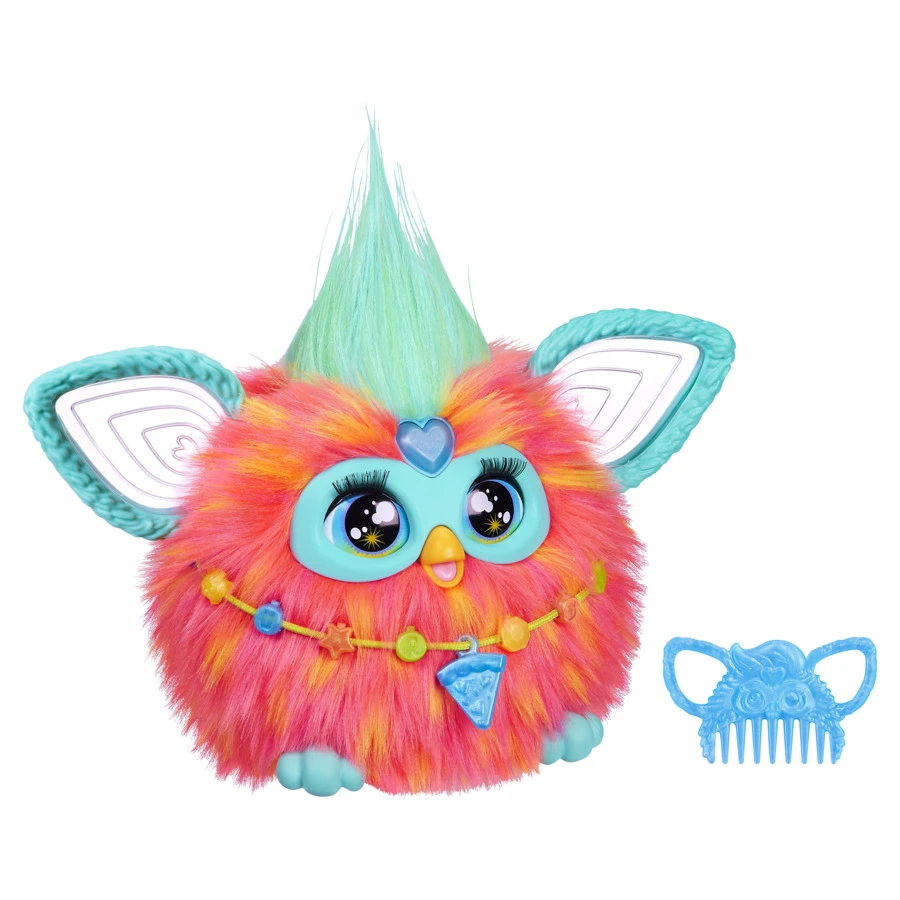
Coral 2023 Furby: the same voice modes, with gentle head, tummy and feeding controls.
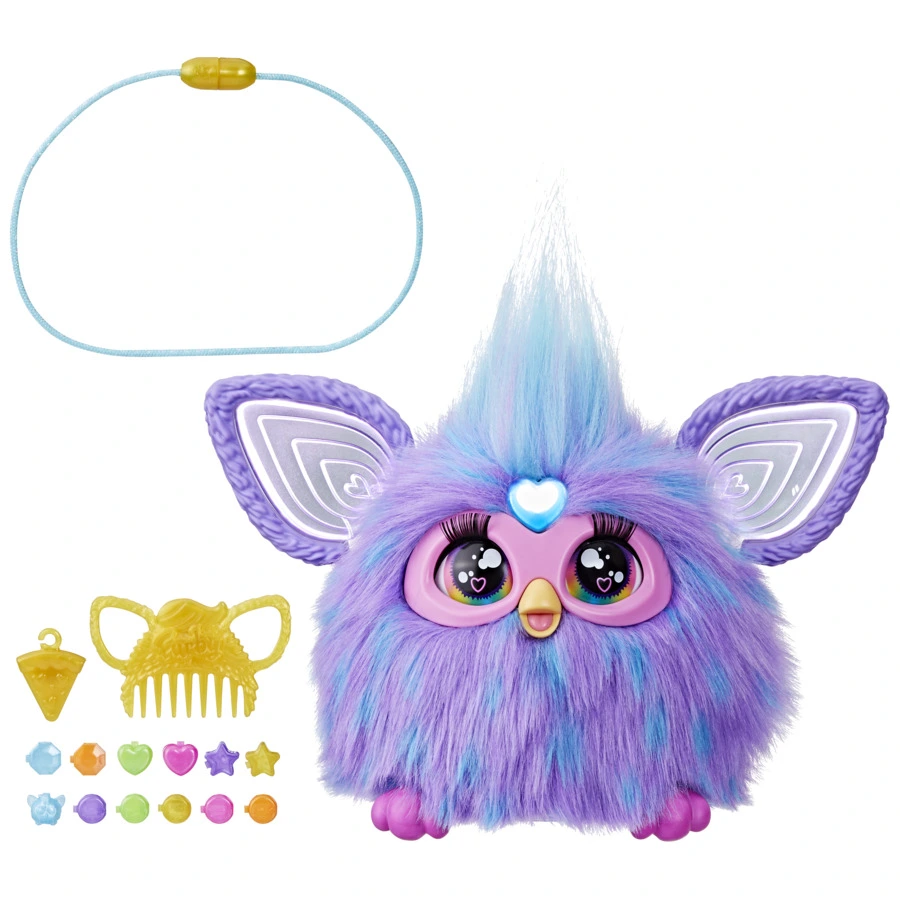
Heart gemBegin the voice sequence or change activities.
HeadPet gently; in play modes, use it to explore options.
TummyTickle or cuddle. Check the command card for mode-specific actions.
MouthOffer the supplied pizza charm for pretend feeding.
A small game to try
For a simple storytelling game, I’d start with Copy Cat. Take turns saying a short character line, pause for Furby’s reply, and let the next player continue the story. You supply the story; “tell me a story” is not one of this model’s named commands.
Be gentle with moving parts. Do not pull the ears or force them into position.
Make it part of everyday play.
Keep the exchange short: one cue, one response, then your turn again. Here are three easy ways to build on the modes above.
A hello with a silly voice
Choose Copy Cat and try a short greeting. Wait for the repeat before the next person speaks; the head control lets you try another voice.
A pretend fortune break
Choose Tell My Fortune, switch to Magic Furball and ask a lighthearted question such as “Will we have a dance party?” Shake for the answer and treat it as part of the game.
A calmer finish
Choose Let’s Chill and follow the activity together. When playtime is over, use the power-off steps above; the calmer mode is still an activity.
Keep pretend play gentle. With your 2023 Furby, use the supplied pizza charm for feeding and take turns with the next activity.
TWO FURBYS, ONE PLAYTIME
Let two 2023 Furbys meet.
Have two of the full-size 2023 models? Their FURdar interaction gives you another way to play together.
Place the Furbys close together.
Press and hold both heart gems for at least five seconds, until you hear “FURdar Activated”.
Tap one Furby’s head to choose the leader, then let the toys interact.
Press the heart gem, say Hey Furby and pause. Give the next command only after the acknowledgement and white listening lights.
Make room for one voice
Turn down the TV or music, move closer and speak at a clear, comfortable volume. Give one command at a time.
Check the words and language
Use a prompt from the list for your toy’s language version. Furbish phrases and free-form questions are not substitutes for the named mode prompts.
Check power before resetting
Try switching the toy off and on. If it remains unresponsive or sounds unusual, have an adult check the four AA batteries and replace them as the manual directs.
Still stuck? Full reset for the 2023 model
A full reset returns Furby to its out-of-box settings. Turn it upside down, then hold the mouth and heart gem together for more than five seconds. Red ear lights and a beep confirm the reset.
Have an adult handle batteries. Surface-clean gently, keep the electronic toy dry and follow the care instructions in the official manual (opens in a new tab).
07 / GOOD QUESTIONS
A few things you might be wondering.
What are the five main Furby commands?
For the full-size 2023 Furby, the five main mode prompts are Dance Party, Copy Cat, Tell My Fortune, Let’s Chill and Light Show. Begin with the heart gem and Hey Furby sequence before choosing a mode.
Are there any secret Furby commands?
Yes. Hasbro confirms I Love You, Fun Fact and Selfie as three extra Easter egg prompts for the 2023 Furby. They sit alongside the five main play modes.
Why does my Furby ignore “Hey Furby”?
Press the heart gem first. Say Hey Furby, wait for the acknowledgement, and give your command when the ears and heart gem turn white. Reduce nearby music or conversation and use the language version supplied with your toy.
Does Furby understand 600 commands?
No. The advertised 600-plus reactions describe things Furby says and does. They are not a list of 600 recognised instructions. Start with the five play modes and three extra prompts in this guide.
Do these commands work with Furby Boom or Connect?
This guide’s voice sequence is for the full-size 2023 Furby. Furby Boom, Connect, 1998 and 2012 models have different controls. Check your generation’s own manual before using a reset or power shortcut.
Can I use Furbish words as commands?
The 2023 English-language manual says Furby does not respond to Furbish. It can speak Furbish, but you should use the mode prompts in the instructions for your toy’s language version.
Is Let’s Chill the same as turning Furby off?
No. Let’s Chill starts a calmer play activity. For full power off on the 2023 model, quickly press the heart gem three times. Laying Furby on its back starts sleep sounds.
Does the 2023 Furby need an app or Wi-Fi?
No. The full-size 2023 Furby works without an app or internet connection. This does not mean older Furby generations use the same controls or have the same features.
How do I make two 2023 Furbys talk to each other?
Place the two full-size 2023 Furbys close together. Hold both heart gems for at least five seconds until you hear FURdar Activated. Tap one Furby’s head to choose the leader, then let the toys interact. These steps are not instructions for every Furby generation.
Can I have a normal conversation with Furby?
The 2023 Furby responds to its named prompts and play controls. It is not a free-form conversation assistant. For a back-and-forth game, choose Copy Cat, say a short phrase and pause for Furby to repeat it. Use Tell My Fortune for playful questions within that mode.
Alisia Wilson · Furby Toy Shop My advice is to learn one mode, enjoy its little variations, then try another. Keep your model’s manual nearby for the controls you use less often, especially batteries and reset steps.
Links open in a new tab. Guide reviewed 16 October 2026.
Furby commands: quick guide
Full-size 2023 Furby · English prompts
Press the heart gem → say Hey Furby → wait for the acknowledgement and white listening lights → say one command.
Say this
Activity
Controls / notes
Dance Party
Music, movement and a little living-room party. Start here when you want lively play.
Tap the head to skip a song; tap the tummy to hear it again. More songs and activities become available as you play.
Copy Cat
Say something short and hear Furby repeat it in a silly voice.
After the prompt, say your phrase. Use the head to change voices and the tummy to repeat. Try one short phrase at a time.
Tell My Fortune
Choose a playful fortune or ask a just-for-fun question.
Rub the tummy in Crystal Furball mode. Shake to switch to Magic Furball, then ask a question and shake for an answer. Keep fortunes as pretend play.
Let’s Chill
Swap the dance floor for a quieter moment together.
Listen for the calm activity and follow along. Tap the head to explore another routine. This is a play mode; use the power controls when you want Furby to stop.
Light Show
Let the illuminated ears take centre stage.
Tap the head for another colour pattern or touch the tummy for a light effect. Hasbro warns that the toy’s flashes may trigger seizures in people sensitive to flashing lights.
I Love You
An extra voice prompt for a sweet exchange with your Furby.
Start with the same heart-gem and Hey Furby sequence, then say I Love You. This is one of the three Easter egg prompts named by Hasbro.
Fun Fact
Try a different side of Furby’s conversation.
Say Fun Fact after the listening signal. Hasbro identifies it as an extra prompt and suggests tapping the head to explore more responses.
Selfie
One more little surprise to add to playtime.
Say Selfie after the listening signal, then follow Furby’s response. Hasbro lists this alongside I Love You and Fun Fact as an Easter egg prompt.
Power off: quickly press the heart gem three times. Sleep: lay Furby on its back. Wake: press the gem or feed Furby.
furbytoyshop.com/furby-commands/ · Alisia Wilson · Reviewed 16 October 2026. Use the supplied manual for your exact model and language. Adult battery handling. Flashes may trigger seizures in sensitive individuals.