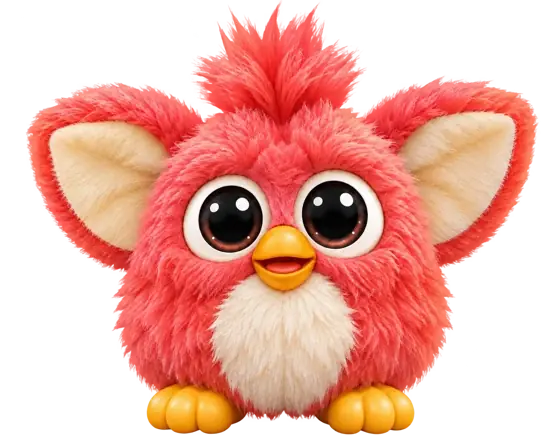
THE FULL-SIZE 2023 FURBY GUIDE
2023 Furby commands.
Ready to play?
A dance, a ridiculous voice, or a gentler end to playtime? I’d choose the moment you want first. Then give Furby one clear invitation.
Here are the words to say, the light to wait for, and the touches that keep each game going. Start with one mode; there is plenty of time for the other little surprises.

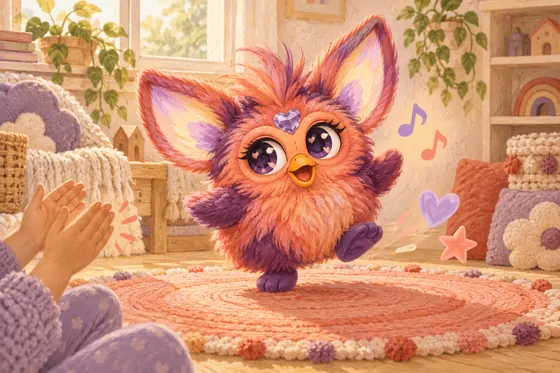
01 / MAKE THE FIRST EXCHANGE EASY
There’s a small pause
that makes a difference.
I would watch the ears before repeating myself. Furby needs a moment to acknowledge “Hey Furby” before it is ready for the activity you want. Saying everything in one breath can miss that listening window.
- 01
Press the heart
Use the gem on the forehead to begin the voice sequence.
- 02
Say “Hey Furby”
Speak clearly nearby, with music and other voices turned down.
- 03
Wait for white
Green ears and a chime come first. White ears and gem mean it is listening.
- 04
Choose one mode
Say one supported prompt, then let Furby finish its response.
Follow Hasbro’s listening-light sequence again whenever you change activities.
This guide centres on the full-size 2023 Furby, including the original Purple and Coral models. A mini Furblet, long-bodied DJ Furby, Connect, Boom or vintage toy has different controls. Our Furby generations guide can help you find the right starting point.
02 / A COMMAND FOR THE MOMENT
The five Furby voice commands,
at a glance.
My suggestion: pick one row and try its two touch controls before moving on. A voice prompt opens the game; the head and tummy often decide what happens next.
| Say this | The mood | Try next |
|---|---|---|
| Dance Party ↗ | Music and movement | Head: next song. Tummy: repeat. |
| Copy Cat ↗ | A short phrase in a silly voice | Speak for up to six seconds. Head: change voice. Tummy: replay. |
| Tell My Fortune ↗ | Playful predictions and questions | Rub the tummy for a fortune; shake to switch to Magic Furball. |
| Let’s Chill ↗ | A quieter shared activity | Follow the routine. Tap the head to explore another. |
| Light Show ↗ | Colourful illuminated ears | Head: colour patterns. Tummy: extra light effects. |
Controls follow the original Hasbro Friendship Guide. The booklet supplied with your exact toy and language version takes priority.
The advertised 600-plus reactions are things Furby says and does. They are not 600 separate voice commands. Start with these five modes and the three extra prompts.
SAY “DANCE PARTY”
Let the first song
set the pace.
For a first play session, I’d begin here. Music gives everyone something easy to join, and the two main controls make sense quickly: a head tap moves to another song; a tummy tap repeats the one you are hearing.
Give each selection a moment before tapping again. If a child finds a favourite, let them be the person who chooses whether to repeat or move on. That small choice can make the toy feel like part of the game.
Hasbro’s booklet describes more songs and a freeze-dance activity becoming available through play. I wouldn’t promise a particular song after a fixed number of taps. Enjoy what is available now and leave room for the next discovery.
A game to try: invent one small move for the chorus. Everyone gets a turn to choose the move when the song repeats.
02 / SAY “COPY CAT”
Keep the line short.
Let the voice do the funny part.
Once Copy Cat asks you to speak, you have six seconds. I’d start with a small greeting or a single character line. A short phrase is easier to hear again than several people talking over one another.
Tap the head to change the playback voice and the tummy to repeat it. Let the recording and reply finish before the next person takes a turn.
This is an echo game. Hasbro says the 2023 toy cannot be taught English; repeating your name in Copy Cat does not add it to a permanent vocabulary. For the differences between generations, see how to make your Furby talk.
03 / SAY “TELL MY FORTUNE”
Two little games.
One very fluffy fortune teller.
If Furby keeps asking for tummy rubs, it has not necessarily missed your question. You may still be in Crystal Furball. The two activities use different invitations.
Give it a tummy rub.
Rub the tummy to hear an encouraging prediction. Let Furby finish before asking for another. I’d treat the reply as a playful story prompt: what kind of adventure could grow from it?
Ask, then gently shake.
A shake switches to Magic Furball. Ask a lighthearted question, then gently shake for the answer. Keep the questions playful—“Will our next game have dancing?” fits the mood.
Hasbro explains the switch between the two fortune activities. The answers are entertainment; they do not predict events.
04 / SAY “LET’S CHILL”
A softer finish
to a busy playtime.
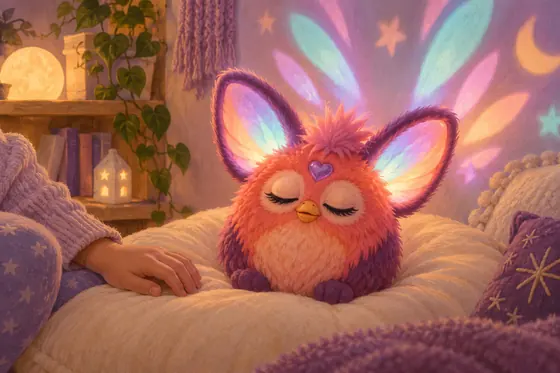
This mode brings together peaceful music, calming exercises and encouraging sayings. Listen to the invitation and follow along. A head tap lets you explore other routines.
I’d make a little space around the toy and let one activity finish before trying the next. There is no need to turn it into a lesson or expect a particular emotional result; it can simply be a quieter moment together.
Let’s Chill is still an active play mode. When you want the toy fully off, use the heart-gem power control.
05 / SAY “LIGHT SHOW”
Give the ears
their own moment.
Light Show runs for ten minutes in the original Friendship Guide. Tap the head to change the colour pattern; touch the tummy for extra effects. I’d explore one control at a time so a child can notice what changed.
There is no volume adjustment on the 2023 model. The different controls on DJ Furby belong to that separate toy.
Hasbro warns that the toy’s flashing lights may trigger seizures in people sensitive to them. Check the warning in your supplied instructions before using light effects.
03 / THREE MORE THINGS TO SAY
Yes, there are
extra Furby commands.
Once the five modes feel familiar, these are lovely little detours. Use the same heart-gem, “Hey Furby” and white-light sequence, then try one prompt.
“I Love You”
A small affectionate exchange to work into a hello or goodbye.
“Fun Fact”
Try another side of Furby’s chatter and listen to the response.
“Selfie”
See what Furby does with this extra prompt; have your own camera ready if you want a picture.
Hasbro confirms all three Easter egg prompts and says head taps reveal different responses. I’d enjoy that small set before chasing long lists of supposed secret phrases online. A funny reaction during ordinary play does not prove a new command was recognised.
04 / WORDS ARE ONLY THE BEGINNING
A familiar touch.
A different job in each game.
The same head tap can skip a song, change an echo voice or choose a light pattern. I would always ask which mode is running before deciding a sensor has stopped working.
- Heart gem
- Begin the listening sequence. Use it again when you want to change modes.
- Head
- Pet gently during ordinary play; tap to explore choices inside a mode.
- Tummy
- Tickle or cuddle during play. In a mode, it may repeat a sound, invite a fortune or change an effect.
- Mouth
- Use a finger or the supplied pizza charm for pretend feeding. Keep real food and liquid away.
Lay Furby on its back.
This begins sleep sounds.
Press the gem three times quickly.
A separate choice from Let’s Chill.
Press the gem or feed Furby.
Use its recognised waking controls.
These are Hasbro’s 2023 power and sleep controls. Use our mini Furby guide for a Furblet.
05 / BRING A FRIEND
Let two Furbys
take the next turn.
For two full-size 2023 toys, I’d clear a small space and turn down other sound. Their interaction is easier to follow when everyone gives them a moment.
- Set the toys facing one another.
- Hold the heart gem on each for at least five seconds, until its “FURdar Activated” announcement.
- Tap one Furby’s head once to choose the leader, then let the pairing begin.
Follow Hasbro’s pairing instructions if they do not connect. Those steps do not make a 2023 toy communicate with an older Boom or Connect.
Pairing with a Furblet? Hasbro gives a different sequence: activate FURdar on the full-size toy, then hold the Furblet’s heart gem for three seconds. See the Furby–Furblet pairing instructions. The mini companion still has its own controls.
06 / WHEN THE ANSWER ISN’T WHAT YOU EXPECTED
Try the smallest useful
check first.
One missed cue would send me back to the listening lights. I’d save a full reset for a persistent problem after ordinary timing and power checks.
It ignores “Hey Furby” or chooses the wrong mode.
Press the gem first, use the wake phrase and wait for white. Reduce competing conversation or music, speak clearly nearby and give one prompt at a time. Use the commands for your toy’s language version. Hasbro specifically recommends less background noise when the wrong command is selected.
It plays, but the head or tummy seems to do the wrong thing.
Check the active mode against the table above. A tummy touch in Light Show has a different job from one in Copy Cat. Try one gentle touch and wait for the result. Do not force the ears or beak, or assume a missed touch identifies a broken component.
It will not wake, freezes, or sounds unusual.
Try the normal wake control. Have an adult check a fresh, correctly fitted set of four AA batteries, including the fourth cell tucked inside the compartment. Follow the polarity marks and close the compartment correctly. Hasbro says ordinary battery replacement keeps unlocked features. Persistent faults should go to Hasbro support.
When should I use a full reset?
A full reset returns the 2023 Furby to its out-of-box settings. It is different from changing batteries or switching the toy off. After normal checks fail, follow the manufacturer’s exact reset instructions: hold Furby upside down, then hold the mouth and heart gem together for more than five seconds. Red ear lights and a beep confirm the reset.
Do not repeat a reset three times or assume it preserves your unlocked progress. For another generation, use the matching Furby reset guidance.
07 / QUICK ANSWERS
A few more things
worth knowing.
What are the five main Furby commands?
For the full-size 2023 model, say Dance Party, Copy Cat, Tell My Fortune, Let’s Chill or Light Show. First press the heart gem, say Hey Furby, and wait for the white ears and gem that signal it is listening.
What are the secret Furby commands?
Hasbro confirms I Love You, Fun Fact and Selfie as three extra Easter egg prompts for the 2023 model. Use the normal listening sequence before saying one. Head taps can reveal different responses.
Why does my Furby ignore a command after Hey Furby?
Wait for the acknowledgement and white listening lights before giving the mode command. Press the heart gem at the start, reduce background noise and say one supported prompt in your toy’s language version.
How do I make my Furby repeat what I say?
Choose Copy Cat and speak when invited. The original 2023 Friendship Guide gives a six-second speaking window. Tap the head to change the playback voice or the tummy to repeat. This is playback, not permanent vocabulary learning.
Why does Tell My Fortune only ask for tummy rubs?
You are likely in Crystal Furball, where tummy rubs invite predictions. Gently shake to switch to Magic Furball, then ask a playful question and shake for its answer.
How do I turn a 2023 Furby off?
Press the forehead heart gem three times quickly for full power off. Laying Furby on its back starts sleep sounds. Press the gem or use the feeding control to wake it. Let’s Chill is a play mode, not the off control.
Does a 2023 Furby need an app or internet connection?
No. Its built-in voice modes and physical play work without an app or internet connection. Use the instructions supplied with the full-size 2023 toy; other generations have different features.
Can I lower the volume on the 2023 Furby?
Hasbro says the 2023 model has no volume-control option. DJ Furby is a different product with different controls. Use the 2023 toy’s power-off sequence when you want it to stop.
Will changing the batteries erase unlocked features?
Hasbro says ordinary battery replacement retains the 2023 Furby’s unlocked features. A full reset is different: it returns the toy to out-of-box settings. Have an adult install a fresh, matching set of four AA batteries as directed.
Do these voice commands work with Furby Boom, Connect or Furblets?
These instructions are for the full-size 2023 model. Boom, Connect and mini Furblets use their own controls. A compatible Furblet can interact with a 2023 Furby through its separate pairing procedure, but that does not give it the five full-size voice modes.
ONE INVITATION. THEN A LITTLE SPACE.
You don’t need every command
to have a good playtime.
Choose the game that fits the moment, wait for the listening signal, and enjoy the reply. I’d rather leave a child curious about the next little discovery than turn Furby into a list of things to get right.